For engineering, construction, completions, commissioning and project leadership teams

Your project already has the data.

Complexity into clarity.

Veridia is a read-only layer that gives you a project status you can trust — built from the data you already have, without replacing existing systems.

  • See what changed overnight
  • Identify what is blocking handover
  • Understand who owns the problem
  • Focus teams on what matters today

No rip-and-replace. Works alongside your existing systems and processes.

On its own, every system looks fine. The real picture lives in the gaps between them — where they quietly disagree. That's what Veridia reads: what changed, what's blocked, what regressed, and where attention is needed.

Why Veridia exists

Built from real project experience.

Veridia is built by a software developer who spent years on major capital projects in the GCC and Europe — working alongside engineering, construction, MC, commissioning, operations and management teams, and building the custom status logic and automation that surfaced blockers and validated readiness. Someone who understands how project data moves, and where visibility breaks down.

The same problems appeared repeatedly:

  • Information existed, but nobody had the full picture
  • Status reporting consumed significant time every week
  • Teams spent more time finding issues than solving them
  • Important changes were often discovered too late

The data always existed — the visibility didn't. Veridia is the system I always wished I had — built to close those gaps, and give every project one status it can finally trust.

What project teams actually see.

One operational view across the whole project — the overview, the answers, and the reports your team already relies on.

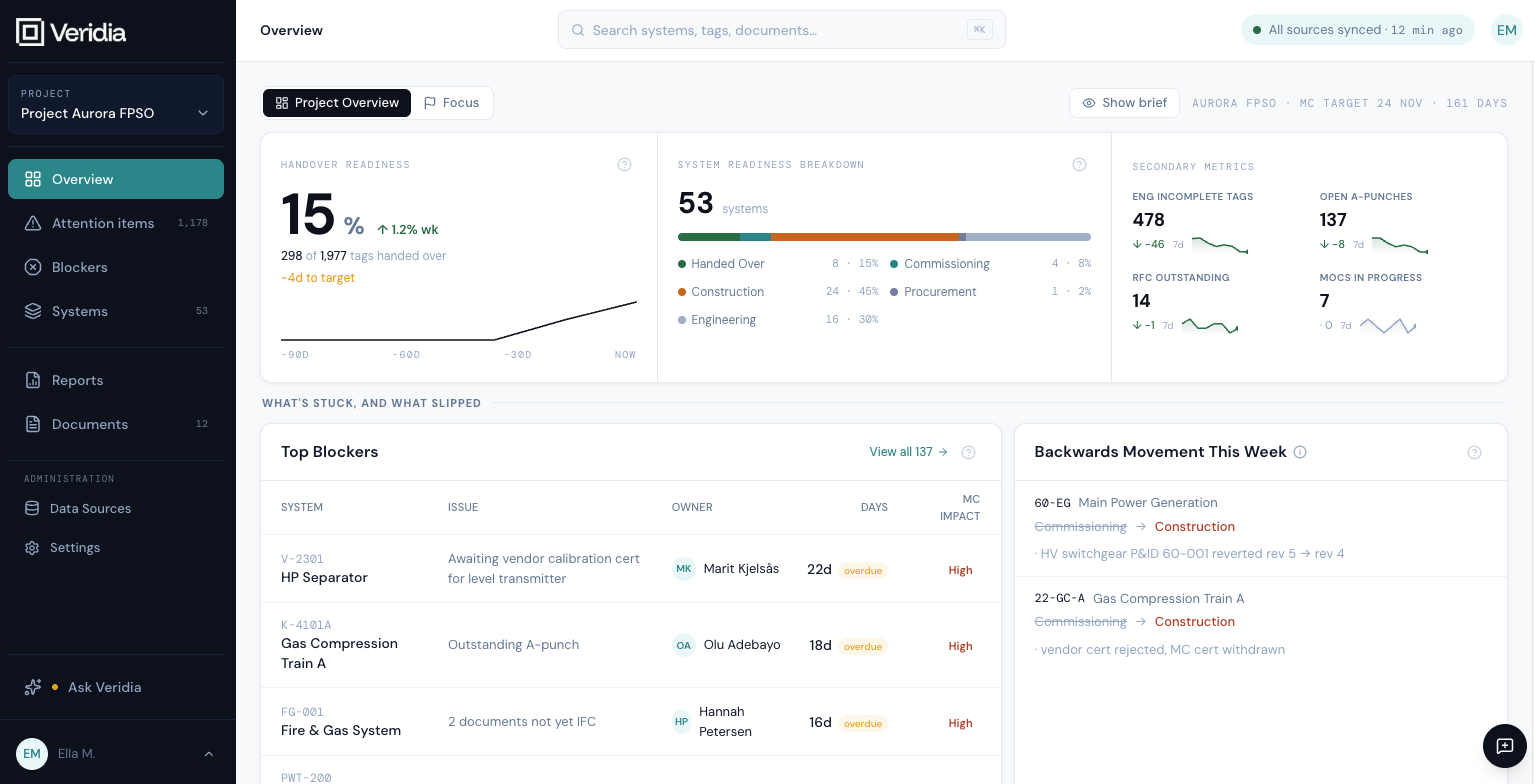
Overview — your project, in one operational view.
Ask Veridia — plain-language questions, cited answers.
Reports — what runs while you're not looking.

Your project's data isn't missing. It's tangled.

Punch lists live in one system. ITRs in another. Vendor documents land in shared folders someone named in 2019. The completions team keeps a separate spreadsheet because the official one is always two weeks behind.

Every Friday, someone spends hours assembling a status pack. By Monday the picture has moved, the milestone has slipped, and nobody can point to which discipline caused it.

The systems work. The data is there. What's missing is one place that reads across all of it — so the people who need answers aren't spending their week reconciling versions instead of making decisions.

Replacing those systems is a multi-year programme nobody has the appetite for. So projects keep running on tribal knowledge, hoping the gaps surface before turnover.

What Veridia delivers.

Read across your systems, surface what's blocked or slipping, score readiness, and report it automatically — configured around how your team already works.

Integration

Connected to every system you already use

Veridia reads across the systems you already use and lines them up against each other — so a signed checklist that's missing its document, or a ‘ready’ system whose part isn't on site yet, shows up as one gap now, not weeks later. One read across completion, punch, ITR, procurement and document status.

Completion systems Engineering registers Document repositories Procurement systems Vendor docs Custom CSV
Intelligence

Know what's blocking, what regressed, what to focus on

The Overview reads the whole project in one view: today's blockers by discipline, anything that regressed overnight, and the short list of things your team should chase before the next gate.

Example regression 14 tags reopened overnight after punch escalation.
Readiness

A live handover readiness score

A single number you can defend in a steering committee — broken down by system, area and discipline, and calculated live from your project data. Every score traces back to the records, blockers and documents behind it, so you can see exactly why it's where it is — not where last week's status pack said you were.

Live calculation across the full project, updated on every sync.

Built around your project's actual workflows

Every project defines readiness differently. Veridia lets you configure the dashboards, rules, statuses, readiness logic, and reporting views that matter to your team — without replacing your existing systems or forcing a standard process onto the project.

Custom status logic Project-specific dashboards Discipline views Executive views Customer reports Approval workflows

Reports that run themselves

Veridia automates the data-driven sections of your reporting — status, readiness, blockers — and keeps them current. Schedule the views your team actually opens; the morning email lands at 06:00 with what changed overnight and what needs an owner today. The written parts — HSE narratives, commentary — stay with your team.

Scheduled · 06:00 UTC

Ask Veridia — every answer cited back to the source

Plain-language questions, sourced answers. "Which packages are blocked by outstanding vendor documents?" Every answer shows the system, record and timestamp it came from — so you can trust it, and check it.

Cited answers

Questions Veridia answers.

Veridia continuously monitors project information and highlights what requires attention before it becomes a problem.

01

Why did readiness drop this week?

Identify regressions, blockers and overdue actions before they impact milestones.

02

What is blocking MC?

See the systems, tags, documents, punch items or approvals preventing progress.

03

What changed overnight?

Track newly created risks, reopened issues and important status changes automatically.

04

Who owns this issue?

Connect problems directly to responsible teams, disciplines and individuals.

05

What should we focus on today?

Prioritise the actions most likely to improve readiness and reduce project risk.

06

Which systems are furthest behind?

Understand where completion progress is slowing and where intervention is needed.

07

Are we still on track for handover?

Monitor readiness trends, milestone risks and emerging threats to delivery.

08

What does leadership need to know?

Generate concise summaries of project status, risks and required decisions.

Live in 2 weeks, proven in 4.

Read-only, one project area, and almost nothing asked of your IT team. You see real results on real data before committing to anything.

Read-only access No system replacement One project area Minimal IT involvement Fixed fee · go / no-go
Week 01–02 01

Plan, connect, go live

Day 1 we agree the plan and the success criteria — what "proven" will mean for your team. We ingest read-only exports from two or three of your existing systems and a sample of your vendor documents. No production access, no firewall changes, no IT ticket. By Day 14 you're live on real data for the sample scope.

  • Day 1: plan and success criteria agreed
  • Read-only sample from one completion or engineering system
  • One project area, one discipline
  • Day 14: live on your own data
Week 03–04 02

Prove it in normal use

Then two weeks of normal use. Veridia automates the data-driven sections of your reporting — status, readiness, blockers — and keeps them current while your team works as usual. On Day 28 we run a Go/No-Go against the criteria you set on Day 1.

  • Two weeks of real, day-to-day use
  • Data-driven reporting automated and kept current
  • Ask Veridia trained on your project
  • Day 28: Go / No-Go against your criteria
What the pilot is built to prove
Friday reporting reduced from 6 hours30 minutes.
Overnight regressions surfaced automatically, before the morning stand-up.
One operational view across 3+ systems — read in place, nothing replaced.

Fixed fee. Go/no-go at the end. No commitment from your IT team.

Keeping project information under your control.

Veridia is designed for projects where confidentiality, traceability and trust matter.

Can other people see our project data?

No. Project information remains private to your organisation. Data is never shared between customers and is not made publicly available.

Private by default

Is our data used to train AI?

No. Project information is used only to support your project. It is not used to train AI models or improve services for other customers.

No model training

How do we know the answers are correct?

Every insight links back to the original source. Teams can see exactly which system, document, register or record an answer came from.

Source verified
  • Read-only access
  • Anonymised before any AI call
  • Zero data retention
  • Full audit log
  • Delete on request
  • Data residency available
Contact

Start the conversation.

Thanks — your request was sent. We'll be in touch within two working days.